3 posts tagged with "openai"

View All Tags

Realtime WebRTC HTTP Endpoints

Sameer Kankute
SWE @ LiteLLM (LLM Translation)
Krrish Dholakia
CEO, LiteLLM
Ishaan Jaff
CTO, LiteLLM

Connect to the Realtime API via WebRTC from browser/mobile clients. LiteLLM handles auth and key management.

How it worksโ€‹

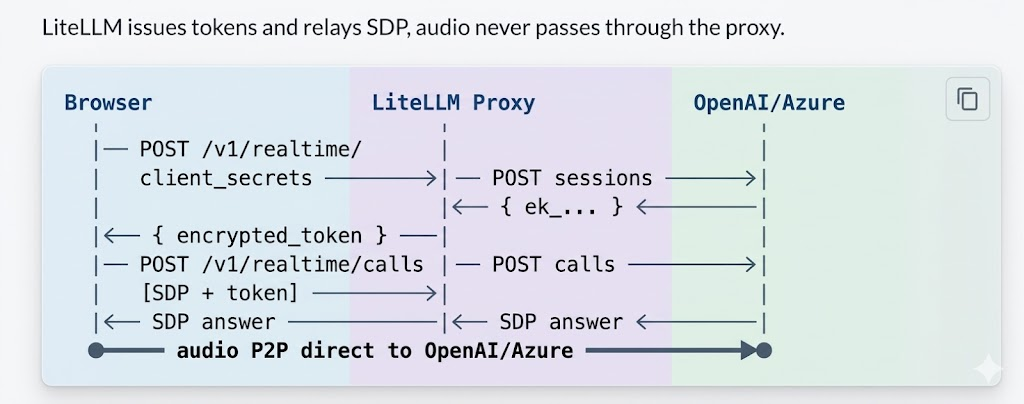
WebRTC flow: Browser, LiteLLM Proxy, and OpenAI/Azure

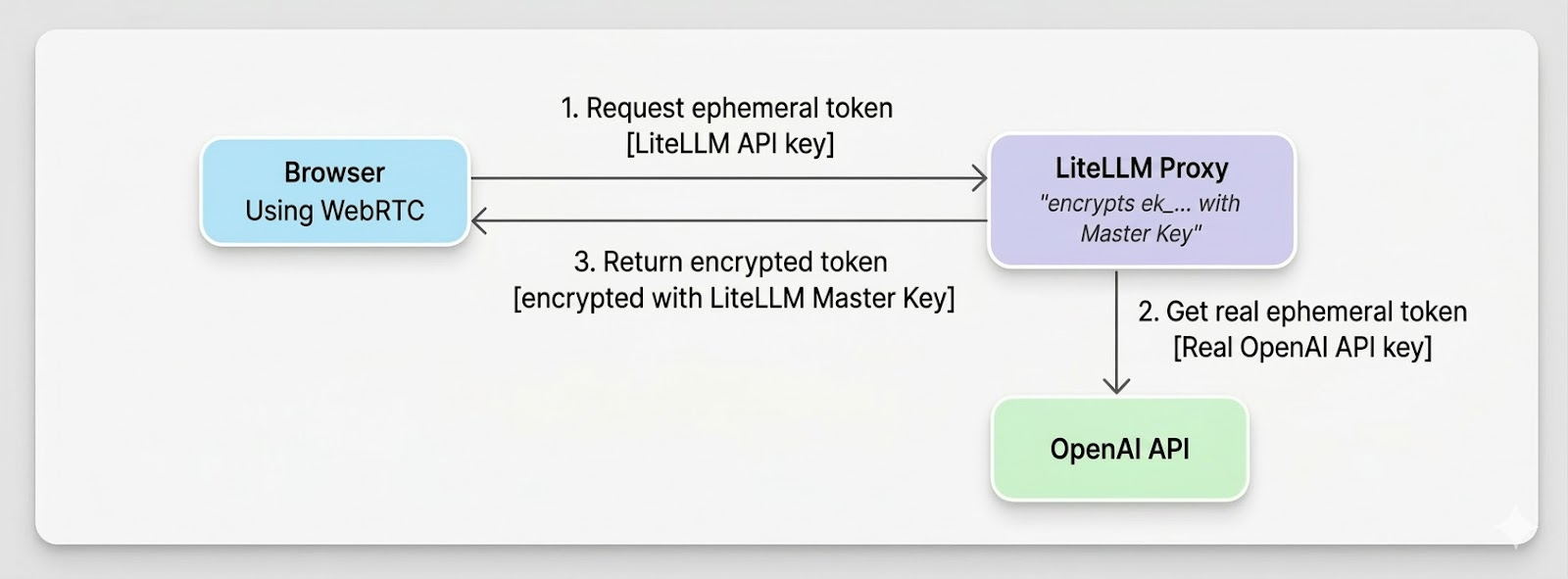
Flow of generating ephemeral token

Ephemeral token flow: Browser requests token, LiteLLM gets real token from OpenAI, returns encrypted token

Proxy Setupโ€‹

model_list:
- model_name: gpt-4o-realtime
litellm_params:
model: openai/gpt-4o-realtime-preview-2024-12-17
api_key: os.environ/OPENAI_API_KEY
model_info:
mode: realtime

Azure: use model: azure/gpt-4o-realtime-preview, api_key, api_base.

litellm --config /path/to/config.yaml

Try it liveโ€‹

INTERACTIVE TESTER
Browser โ†’ LiteLLM โ†’ OpenAI ยท WebRTC
โ–ผ

Client Usageโ€‹

1. Get token - POST /v1/realtime/client_secrets with LiteLLM API key and { model }.

2. WebRTC handshake - Create RTCPeerConnection, add mic track, create data channel oai-events, send SDP offer to POST /v1/realtime/calls with Authorization: Bearer <encrypted_token> and Content-Type: application/sdp.

3. Events - Use the data channel for session.update and other events.

Full code example
// 1. Token
const r = await fetch("http://proxy:4000/v1/realtime/client_secrets", {
method: "POST",
headers: { "Authorization": "Bearer sk-litellm-key", "Content-Type": "application/json" },
body: JSON.stringify({ model: "gpt-4o-realtime" }),
});
const { client_secret } = await r.json();
const token = client_secret.value;

// 2. WebRTC
const pc = new RTCPeerConnection();
const audio = document.createElement("audio");
audio.autoplay = true;
pc.ontrack = (e) => (audio.srcObject = e.streams[0]);
const ms = await navigator.mediaDevices.getUserMedia({ audio: true });
pc.addTrack(ms.getTracks()[0]);
const dc = pc.createDataChannel("oai-events");
const offer = await pc.createOffer();
await pc.setLocalDescription(offer);

const sdpRes = await fetch("http://proxy:4000/v1/realtime/calls", {
method: "POST",
headers: { "Authorization": `Bearer ${token}`, "Content-Type": "application/sdp" },
body: offer.sdp,
});
await pc.setRemoteDescription({ type: "answer", sdp: await sdpRes.text() });

// 3. Events
dc.send(JSON.stringify({ type: "session.update", session: { instructions: "..." } }));

FAQโ€‹

Q: What do I do if I get a 401 Token expired error?
A: Tokens are short-lived. Get a fresh token right before creating the WebRTC offer.

Q: Which key should I use for /v1/realtime/calls?
A: Use the encrypted token from client_secrets, not your raw API key.

Q: Should I pass the model parameter when making the call?
A: No, the encrypted token already encodes all routing information including model.

Q: How do I resolve Azure api-version errors?
A: Set the correct api_version in litellm_params (or via the AZURE_API_VERSION environment variable), along with the right api_base and deployment values.

Q: What if I get no audio?
A: Make sure you grant microphone permission, ensure pc.ontrack assigns the audio element with autoplay enabled, check your network/firewall for WebRTC traffic, and inspect the browser console for ICE or SDP errors.

Day 0 Support: GPT-5.4

Sameer Kankute
SWE @ LiteLLM (LLM Translation)
Krrish Dholakia
CEO, LiteLLM
Ishaan Jaff
CTO, LiteLLM

LiteLLM now supports fully GPT-5.4!

Docker Imageโ€‹

docker pull ghcr.io/berriai/litellm:v1.81.14-stable.gpt-5.4_patch

Usageโ€‹

1. Setup config.yaml

model_list:
- model_name: gpt-5.4
litellm_params:
model: openai/gpt-5.4
api_key: os.environ/OPENAI_API_KEY

2. Start the proxy

docker run -d \
-p 4000:4000 \
-e OPENAI_API_KEY=$OPENAI_API_KEY \
-v $(pwd)/config.yaml:/app/config.yaml \
ghcr.io/berriai/litellm:v1.81.14-stable.gpt-5.4_patch \
--config /app/config.yaml

3. Test it

curl -X POST "http://0.0.0.0:4000/chat/completions" \
-H "Content-Type: application/json" \
-H "Authorization: Bearer $LITELLM_KEY" \
-d '{
"model": "gpt-5.4",
"messages": [
{"role": "user", "content": "Write a Python function to check if a number is prime."}
]
}'

Notesโ€‹

  • Restart your container to get the cost tracking for this model.
  • Use /responses for better model performance.
  • GPT-5.4 supports reasoning, function calling, vision, and tool-use โ€” see the OpenAI provider docs for advanced usage.

Day 0 Support: GPT-5.3-Codex

Sameer Kankute
SWE @ LiteLLM (LLM Translation)
Krrish Dholakia
CEO, LiteLLM
Ishaan Jaff
CTO, LiteLLM

LiteLLM now supports GPT-5.3-Codex on Day 0, including support for the new assistant phase metadata on Responses API output items.

Why phase matters for GPT-5.3-Codexโ€‹

phase appears on assistant output items and helps distinguish preamble/commentary turns from final closeout responses.

Reference: Phase parameter docs

Supported values:

  • null
  • "commentary"
  • "final_answer"

Important:

  • Persist assistant output items with phase exactly as returned.
  • Send those assistant items back on the next turn.
  • Do not add phase to user messages.

Docker Imageโ€‹

docker pull ghcr.io/berriai/litellm:v1.81.12-stable.gpt-5.3

Usageโ€‹

1. Setup config.yaml

model_list:
- model_name: gpt-5.3-codex
litellm_params:
model: openai/gpt-5.3-codex

2. Start the proxy

docker run -d \
-p 4000:4000 \
-e ANTHROPIC_API_KEY=$OPENAI_API_KEY \
-v $(pwd)/config.yaml:/app/config.yaml \
ghcr.io/berriai/litellm:v1.81.12-stable.gpt-5.3 \
--config /app/config.yaml

3. Test it

curl -X POST "http://0.0.0.0:4000/v1/responses" \
-H "Content-Type: application/json" \
-H "Authorization: Bearer $LITELLM_KEY" \
-d '{
"model": "gpt-5.3-codex",
"input": "Write a Python script that checks if a number is prime."
}'

Python Example: Persist phase with OpenAI Client + LiteLLM Base URLโ€‹

from openai import OpenAI

client = OpenAI(
base_url="http://0.0.0.0:4000/v1", # LiteLLM Proxy
api_key="your-litellm-api-key",
)

items = [] # Persist this per conversation/thread


def _item_get(item, key, default=None):
if isinstance(item, dict):
return item.get(key, default)
return getattr(item, key, default)


def run_turn(user_text: str):
global items

# User message: no phase field
items.append(
{
"type": "message",
"role": "user",
"content": [{"type": "input_text", "text": user_text}],
}
)

resp = client.responses.create(
model="gpt-5.3-codex",
input=items,
)

# Persist assistant output items verbatim, including phase
for out_item in (resp.output or []):
items.append(out_item)

# Optional: inspect latest phase for UI/telemetry routing
latest_phase = None
for out_item in reversed(resp.output or []):
if _item_get(out_item, "type") == "output_item.done" and _item_get(out_item, "phase") is not None:
latest_phase = _item_get(out_item, "phase")
break

return resp, latest_phase

Notesโ€‹

  • Use /v1/responses for GPT Codex models.
  • Preserve full assistant output history for best multi-turn behavior.
  • If phase metadata is dropped during history reconstruction, output quality can degrade on long-running tasks.